Citrix latest hdx
Citrix HDX Image Quality Enhancement
HDX incorporates a range of techniques to deliver exceptional image fidelity to users accessing virtual desktops and applications across diverse devices and network conditions. This document delves into the core mechanisms that contribute to optimized image quality:
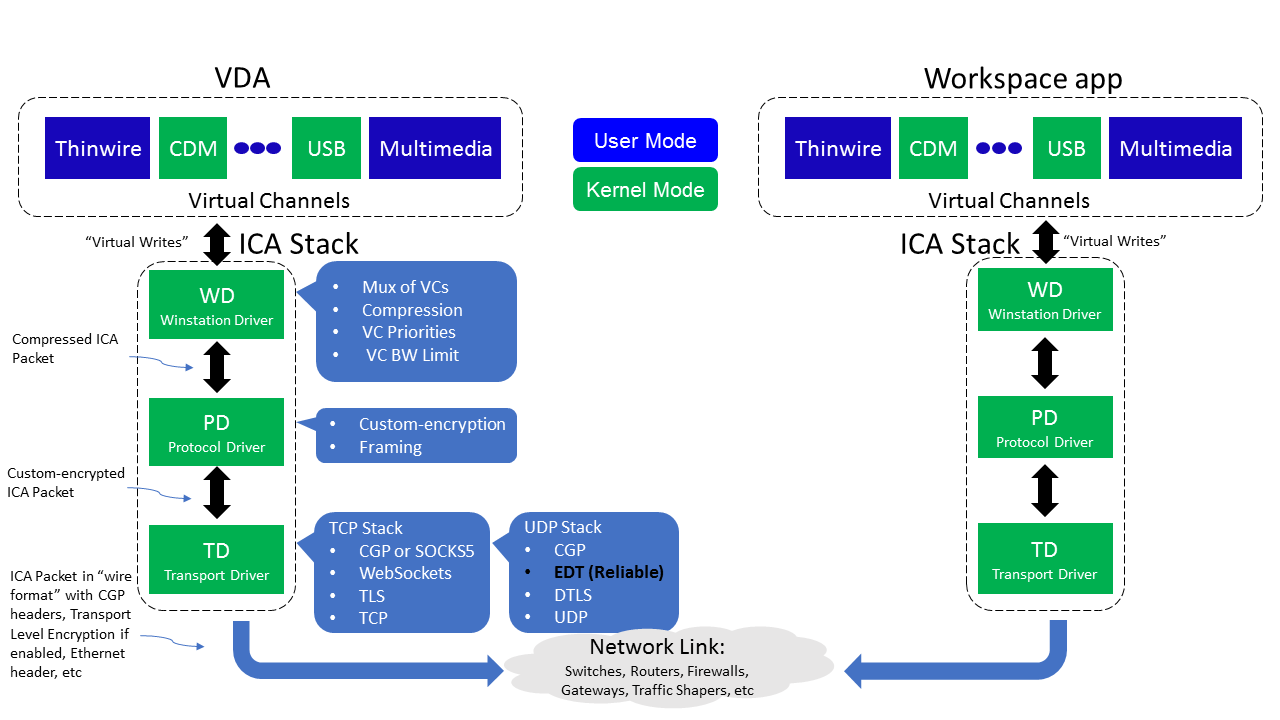
1. Intelligent Traffic Management
- HDX Adaptive Throughput: This dynamic mechanism fine-tunes the peak throughput of ICA sessions by intelligently adjusting output buffers. Initially set high, these buffers facilitate faster data transmission to clients, particularly on high-latency networks. HDX continuously monitors session interactivity to detect potential bottlenecks caused by large data streams. If such issues arise, HDX reduces throughput to mitigate their impact and maintain responsiveness.
2. Advanced Compression Techniques
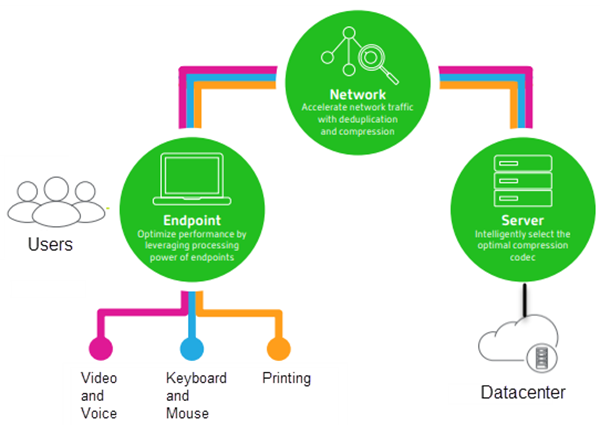
- Content-Aware Encoding: HDX employs content-specific algorithms to compress different image types (e.g., text, graphics, photos) with varying levels of detail preservation. This ensures optimal bandwidth usage while maintaining fidelity for critical elements.
- Lossless and Lossy Compression: HDX provides a spectrum of compression options, allowing you to strike a balance between image quality and bandwidth consumption. Lossless compression preserves all image data but requires more bandwidth. Lossy compression reduces file sizes by discarding some data, potentially introducing minor quality artifacts, but offering significant bandwidth savings. The “Visual Quality” policy setting in Citrix Workspace app empowers you to control this trade-off.
3. Hardware Acceleration Leverage
- GPU Integration: HDX can leverage the graphical processing unit (GPU) on the client device or server to accelerate image processing tasks. This offloads the workload from the CPU, enhancing overall performance and image rendering smoothness.
- VDI/vApp Hardware Decoding: HDX can exploit hardware decoding capabilities available on the virtual machine (VM) where the virtual desktop or application resides. This can significantly improve image and video playback performance, especially for high-resolution content.
4. Client-Side Rendering and Redirection
- Browser Content Redirection: For HTML5 and WebRTC multimedia content, HDX can offload rendering to the client device’s browser. This reduces strain on the server and network, potentially improving image quality and responsiveness.
- Client-Side Content Fetching: Whenever feasible, HDX enables user devices to stream multimedia files directly from the source on the internet or intranet, bypassing the server. This can alleviate server load and potentially enhance image quality and delivery speed.
5. Network Optimization Techniques
- Multi-Stream ICA: HDX can distribute ICA traffic across multiple network connections (TCP streams for real-time, interactive, background, and bulk data; UDP streams for voice and Framehawk display remoting). This load balancing can improve responsiveness and image quality, particularly on congested networks.
- Quality of Service (QoS): In conjunction with network routers that support QoS, HDX can prioritize ICA traffic to ensure it receives adequate bandwidth for optimal image quality, especially during periods of network congestion.
Configuration Considerations
- Client and Server Compatibility: Ensure your Citrix Workspace app version and the VDA (Virtual Delivery Agent) on the server are compatible with the desired image quality features. Refer to Citrix documentation for specific compatibility details.
- Network Bandwidth: Evaluate your network bandwidth limitations and adjust image quality settings accordingly. Higher quality settings demand more bandwidth.
- User Experience Optimization: The optimal image quality configuration depends on user needs and priorities. Balance image fidelity with factors like application responsiveness and bandwidth availability.
Advanced Customization (Optional)
For granular control over image quality, consider these advanced settings (consult Citrix documentation for detailed instructions):
- Target Frame Rate Policy: Specifies the maximum frames per second sent from the virtual desktop, potentially affecting video smoothness.
- Display Memory Limit (Deprecated): While no longer directly configurable, HDX automatically allocates sufficient memory for the client’s display layout.
- Unicode Keyboard Mapping: Enables keyboard layout synchronization between the client and server for non-Windows Citrix Receivers.
By effectively utilizing these strategies, you can create a visually rich and responsive experience for users working with virtual desktops and applications through Citrix HDX. ```
This post is licensed under CC BY 4.0 by the author.